In auto repair, there are many moving parts to keep track of—both the literal parts your shop uses to repair vehicles, and the parts of your business that determine your shop’s efficiency, security, and ability to grow. If you want your shop to flourish, it’s crucial to devote part of your business to keeping track of the parts you order.
Many shops track parts in terms of cost of goods sold. The parts you need for the job are included on every repair order, so it’s easy to see what parts your customers are paying for as long as you have a solid process for building repair orders.
But what about in terms of accounts payable? How does your shop track how much you’re spending for parts from the supplier?
Should You Use Purchase Orders or “Save Time?”
For your accounts payable, or determining how much you’ll owe your parts suppliers, there are typically two routes you can take:
Wait for the parts bills to come in and trust that you’re being charged the correct amount, or
Create a formal purchase order each and every time you order parts from a supplier.
The advantage of going with the first route is that you save a little bit of time; there’s no second step of reconciling the part you need to purchase on a purchase order. But the cons far outweigh this advantage—because this is where shops can start to lose money.
For example, your ROs may indicate that you have a 30% profit margin on parts, but if you don’t accrue your parts bill, you won’t know for sure if that’s the case until the parts bill hits your account. Suddenly, when the money gets taken out, your margins are razor-thin.
So, what happened?
Did a supplier charge too much? Were you double-charged? Was an unauthorized person ordering parts on your account? Was there theft?
It’s hard to tell if there is no paper trail or purchase order for you to look at.
If you’re not paying attention to your parts orders on the accounts payable side, you could be losing money, and it will typically take a large missing chunk of change for you to realize that something is wrong. Withouta paper trail, figuring out the problem is not only difficult but also extremely time consuming. Once you notice that there is a loss you can’t account for, all the “time saved” by skipping the purchase order step comes back in the form of time spent trying to figure out the issue.
By reconciling your parts orders on both repair orders and purchase orders, you can easily check to see what’s going on, protecting your shop from incidents where you are losing money due to overages, slip-ups, theft, and overcharges.
How to Build a Better Parts Ordering System
When it comes to tracking parts on repair orders and purchase orders, consistency is key. Shops that have strong, consistent processes and procedures—and follow them every single time—rarely have issues with leakage and theft; they instill habits in their team to keep careful track of all parts.
As long as your shop has a repeatable process for adding parts to repair orders and putting in purchase orders, you will be able to quickly identify any issues as soon as they crop up. Every service advisor and employee that orders parts and builds repair orders for customers should use the same method for filling out repair orders, creating purchase orders, and inputting this information into your shop management system and accounting system.
Create a standard process for each of the following:
How jobs get posted
How repair orders are built
How repair orders are approved
How parts orders are posted
How purchase orders are written and sent to suppliers
How purchase orders are approved
How parts and purchase data get analyzed
Instill Parts Ordering Best Practices with Tekmetric
Standard procedures for ordering parts and creating repair orders are built into Tekmetric. We give shops the tools and guardrails needed to effortlessly track parts throughout each step of the repair process.
From our intuitive repair order builder to our integrated parts ordering and inventory systems, we aim to align your team so that no money slips through the cracks. And our industry leading analytics and reporting tools allow you to keep track of your shop’s financial history in realtime.
This article was written with the guidance of automotive repair industry CPA Hunt Demarest of Paar, Melis, & Associates, P.C.
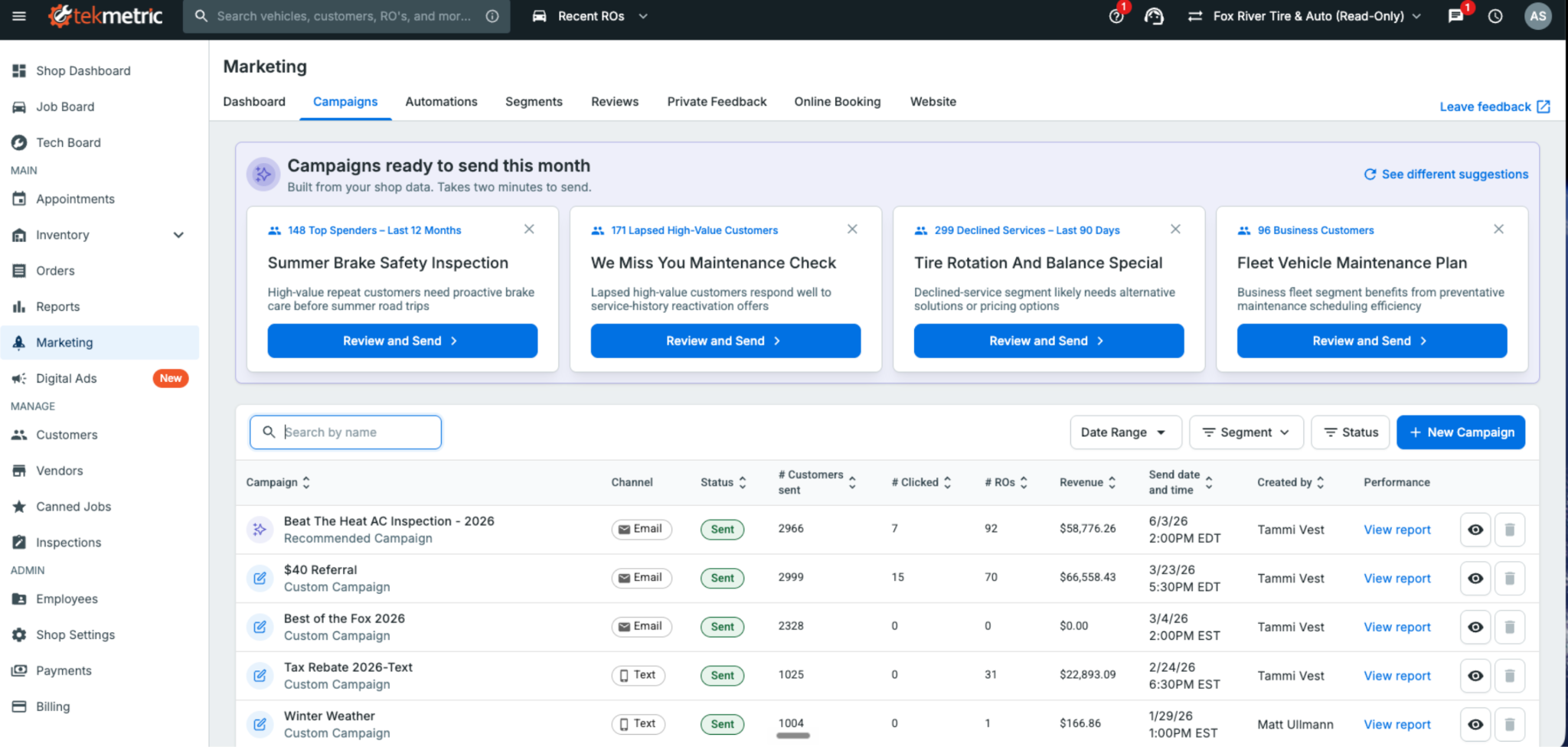
Tekmetric Marketing now builds ready-to-send campaigns. The message is written and the audience is selected. All that's left is to review, personalize, and send.
Most shop owners know the fastest way to fill this week’s bays is by bringing back customers who already trust them — the ones whose vehicles you serviced months ago but haven’t seen since. Re-engaging existing customers is one of the most effective ways to generate new repair orders.
The problem is finding the time to do it. Figuring out what to send, who to send it to, and when to send it almost always loses out to the car on the lift or the customer standing at the front counter
That's where Tekmetric Marketing's Recommended Campaigns come in.
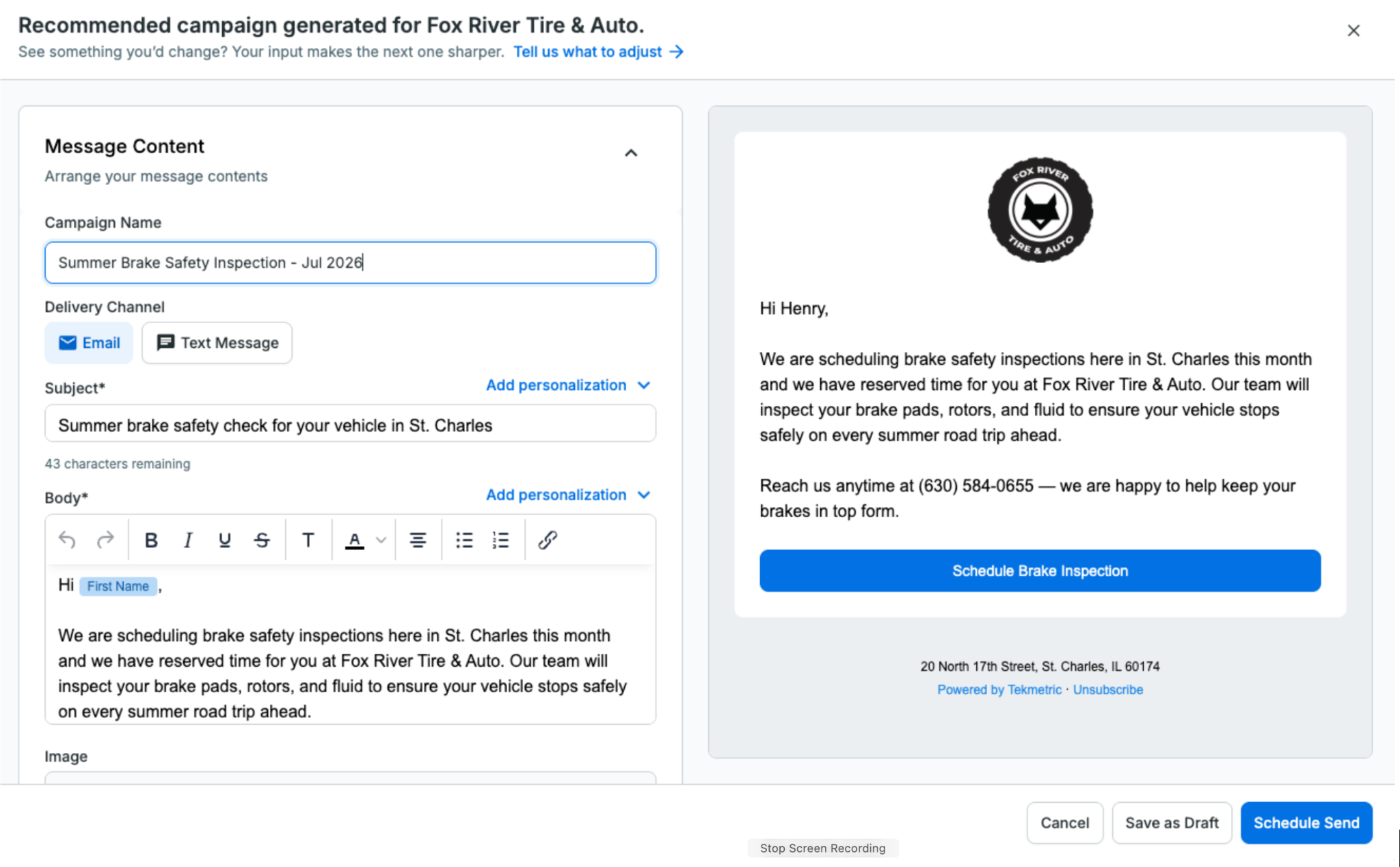
Instead of starting with a blank page, Tekmetric Marketing does the heavy lifting for you. It analyzes your shop’s data and recommends campaigns that are ready to go. The audience is selected, the message is drafted, and all that’s left is for you to review it, make any changes you’d like, and send.
No blank screen. No guesswork.
Just a campaign ready to help bring customers back.
How It Works
Recommended Campaigns automatically surfaces ready-to-send campaigns tailored to your shop using the information Tekmetric already knows — your customers, previous campaigns, location, and seasonality.
You’re always in control.
Review the recommendation, personalize the message so it sounds like your shop, adjust the audience if you’d like, choose when to send it, and you’re done.
What used to take an hour staring at a blank screen can now be done in just a few clicks.
How Fox River Tire & Auto Uses Recommended Campaigns
Like most shops, Fox River Tire & Auto in St. Charles, Illinois, wants to stay connected with customers and bring them back when the time is right. But deciding what campaign to send, then building it from scratch, takes time most shops don't have.
Recommended Campaigns gives Tammi and her team a starting point instead of a blank page. They review the recommendations, edit the suggested content to fit their brand, and send with confidence.
"Recommended Campaigns provide an excellent launchpad for re-engaging with our customers. Instead of starting from scratch, we refine the suggested content to fit our brand and send it with confidence. The process is straightforward, time-saving, and always delivers."
— Tammi Vest, Business Manager, Fox River Tire & Auto
From Reports to Results
Recommended Campaigns is part of a much bigger shift in where Tekmetric Marketing is headed.
For years, marketing platforms have been good at showing you what already happened: campaign reports, open rates, clicks, and dashboards. That’s valuable, but it still leaves the work on you.
Tekmetric Marketing is evolving beyond reporting. Increasingly, it’s helping you decide what to do next, and doing more of the work for you.
You’ve already seen this with Recommended Review Responses. When a customer leaves a Google review, Tekmetric drafts a thoughtful response for you to review and approve.
Recommended Campaigns is the next step.
Instead of simply telling you that you should market to your customers more often, Tekmetric Marketing puts a campaign directly in front of you — already drafted, targeted, and ready to send.
Your marketing should keep working even while you’re heads-down under a hood.
One Year of Continuous Innovation
Since launching Tekmetric Marketing in the fall of 2025, thousands of shops have made it part of how they attract new customers and bring existing ones back.
We’ve also continued investing in the platform based on feedback from shops like yours.
Recent additions include:
Rich text and custom links in every email so you can create more engaging emails and link directly to booking pages, review sites, and promotions. Bold a headline, organize services into a list, and drop in links to your booking page, review site, or a promotion, in both campaigns and automated emails like review requests and service reminders.
Recurring blocks for your calendar for lunch breaks, holidays, staff meetings, and other recurring events. Easily add recurring lunch blocks, staff meetings or holidays to your calendar with a few clicks. No more appointments booked over your team events without you knowing.
Smarter marketing-source tracking on appointments and ROs: Automatically associate appointments and repair orders with the latest marketing campaign or automation that reached the customer. When a customer books after getting a message, the marketing source pre-fills with the most recent campaign or automation sent to them, so attribution is accurate without the guesswork.
Recommended Review Responses, helping you respond to Google reviews in just a few clicks.
Every one of these improvements started with feedback from shop owners looking for simpler, smarter ways to grow their business.
Keep it coming.
Already using Tekmetric Marketing?
Head to Marketing → Campaigns to see what's recommended for your shop and send your first campaign in just a few clicks.
New to Tekmetric Marketing?
See how Tekmetric Marketing helps shops bring customers back with online booking, automated reminders, review generation, and Recommended Campaigns.
Adjusting your pricing on parts to make a profit is pretty straightforward. But when it comes to labor times for auto repair shops…that’s where things can get a bit tricky. Yes, you need competitive labor rates, but you also need to keep those rates reasonable so you don’t scare off your customers with sky-high prices.
3 ways your shop can make more money on labor:
By using a labor matrix
By creating custom labor rates
By applying a labor guide markup
Before we dive into the differences between these three methods for setting the best labor times at your shop, here’s a quick refresher on the one thing these methods have in common: the labor guide.
What is a Labor Guide?
A labor guide is like the gospel of labor times for auto repair shops. It tells you how long, on average, it takes to complete different types of repair work. Remember that the times listed in auto repair labor guides are averages, so it’s best to treat them as a starting point.
Factors That Can Affect Labor Times for Auto Repair Shops
Let’s take a look at some of the factors to consider when determining how much to mark up (or mark down) your shop’s labor rates.
Age of Vehicle
Older vehicles are often trickier to fix, especially because finding parts for them can require a time-consuming hunt across parts suppliers. You can make up for the time spent hunting down uncommon parts by charging more for all repairs involving vehicles over a certain age.
Geographic Location
Some areas lead to different types of repair challenges that can affect the time it takes for repairs. For example, shops in Syracuse, New York—the snowiest city in America—might find themselves working with cars that have rust, which can significantly add to the time it takes to remove or even clean certain parts.
Experience of Technician
Chances are, you’re already paying experienced technicians a higher base salary or hourly rate. However, certain situations might call for cranking up those numbers, like if you really need to put their skills to the test for a tricky repair for a client who wants it done ASAP.
Customer Needs
You can offer customers who need their cars back fast a “Pro Tech” rate, where your tech wraps up the job in record time. When you’re asking techs to complete a job faster than the time on the labor guide, and still do a good job, the customer is getting special service. Be sure to let customers know that speediness comes with a surcharge.
Relationship With Customers
It’s a good idea to consider giving loyal customers a special rate as a token of appreciation. With that said, industry leaders advise sticking to your labor rates as much as possible, because if it becomes a habit, you risk financially harming your business.
How to Choose a Reliable Labor Guide
A reliable auto repair labor guide is foundational for your shop when you’re setting labor rates, so you’ll want to use a labor guide that stays up-to-date with the latest labor times in the industry. Just like many people use online directories instead of the Yellow Pages, many auto repair shops use digital labor guides that are constantly updated with the latest labor times.
When seeking out a digital labor guide, look for one that:
Offers consistent, comprehensive data on labor times from industry leaders, so you can set accurate labor rates that will keep your shop profitable
Adds labor times for new vehicles and jobs periodically, so your shop’s pricing can stay competitive
Integrates with your auto repair shop management software, so you don’t have to dig through multiple systems
The holiday season is now in full swing, and as a shop owner, you’re probably thinking about how to best lead your team during this time.
Between the hot chocolate and the carols, there will be a lot you’ll have to navigate, including holiday pay and time-off requests.
By preparing and leveraging auto repair shop management software, all of this can be a piece of cake (or pie, if that’s your holiday dessert of choice).






.svg)



.svg)

.svg)
.svg)
.svg)
.svg)
.svg)
.svg)