
No items found.

Five Questions to Ask Before Signing a Shop Management Software Contract

Kris Turner

|

July 28, 2026

|

Read time: 3 min

Before you sign, make sure the shop management software is worth the commitment

Committing to shop management software is a real decision. The right platform runs your front counter, bays, reporting, and customer communications. The contract you sign shapes how your shop operates every day.

That’s exactly why the contract deserves scrutiny before you sign it. A confident vendor will answer hard questions plainly. A shaky one is vague. The five questions below are designed to help you tell the difference and to keep you from getting locked into a contract that doesn't serve your shop.

Here’s what to ask before you sign anything.

1. How flexible is the contract, and do you have to commit to a full year?

What to ask: Do you offer month-to-month billing, or is an annual contract the only option? What happens at renewal?

Why it matters: Your shop isn't static. Car count swings with the seasons, you might open a second location, or you might simply want to prove the software works before you commit long-term. A rigid 12-month lock-in removes all of that flexibility and puts the risk on you.

What a good answer sounds like: A vendor that believes in its product will let you choose. Tekmetric offers flexible month-to-month billing or a discounted annual plan, with no long-term contracts required. That structure means you can scale with your season instead of renegotiating, and the annual plan becomes a discount you opt into — not a cage you're stuck in.

And if a contract is the very thing keeping you stuck somewhere else? That doesn't have to be a dealbreaker. Tekmetric routinely works with shops that want to switch but are locked into other contracts and frees them up to make the move. Tekmetric customers also see an increase in their ARO after switching.

2. What does support actually look like after I sign?

Support quality is invisible during the sales process and unavoidable afterward. Plenty of shops sign up on the strength of a great demo and then discover that help means a ticket queue and a long wait. When your shop management system goes sideways, every minute is a car you can’t check out. Where that support sits matters too — a U.S.-based team understands how your shop actually runs and speaks your language, literally and operationally.

Look for multiple live channels and people who understand shops. Tekmetric provides U.S.-based phone, chat, and email support — real people, not just a knowledge base. Shop owners consistently point to responsiveness as a reason they stay.

“There is one support number to call when there’s an issue. There hasn’t been an issue. At all. It’s amazing.”
-Andrew Klement, Finley River Auto & Diesel

Ask any vendor directly where their support team is located and how a live person is reached during your busiest hours.

3. How open is the platform, and will it work with the tools I already use?

Your shop already runs on a tech stack — parts suppliers, QuickBooks, labor guides, a payment setup. Software that can’t connect to those tools forces double data entry and manual workarounds that eat the time you were trying to save. A closed platform quietly becomes a tax on your team every day.

A platform should meet your shop where it is. Tekmetric connects to more than 70 integrations consolidated into one workflow, spanning parts ordering, accounting, and more. Shops feel the difference when it works.

“They integrate so seamlessly, it’s amazing how quickly when we turn an RO on or open it up and approve it that it jumps into AutoVitals for the technicians.”
-Kelsey Lancaster, Performance Automotive Repair

Ask the vendor to confirm your specific vendors are supported before you sign. An open platform will have a clear, published integration list.

4. What do you actually guarantee about onboarding?

Onboarding is where good software deals go bad. If setup drags for weeks, or if you’re left to figure it out, the time savings you were promised evaporate, and your team’s trust in the new system goes with them. This is the single most common place buyers get burned.

You want a person accountable for your launch, not a self-serve checklist. Tekmetric assigns a dedicated onboarding manager and is often praised for simple onboarding. Most shops are up and running within a week, not dragged through a monthlong setup. That speed shows up on the floor, too.

“I mastered it within a week. … I have new employees starting all the time and I know that within a day or two they can write up a customer, build estimates, cash out a customer, make appointments.” 
-Leroy Ingram, Ooroo Auto Care

Your existing customer and vehicle data comes with you, so you’re not starting from a blank screen. Ask any vendor for a realistic timeline, who your point of contact is, and how your data gets moved over before you sign.

5. What happens if it isn’t the right fit?

Nobody signs up planning to leave, but how a vendor handles the exit tells you how they think about the relationship. A technology company counting on lock-in rather than results is a business betting you won’t be happy enough to stay by choice. The freedom to walk away is what makes staying a real decision.

A month-to-month option is itself a form of freedom. It means a vendor has to earn your business every month rather than bank on a signature. Tekmetric’s no-long-term-contract structure reflects that mindset, and your shop’s data is yours. Don’t let a fear of switching hold your shop back.

“We were just scratching our heads like why we hadn’t been doing this for a long time.” 
-Steve Flones, KC Auto Clinics

Still, it’s fair to ask any vendor to walk you through how you’d wind things down and take your records with you if the fit ever changed. A confident technology vendor answers that plainly.

The through-line: confidence answers questions

Notice what all five questions have in common. A platform that’s confident in the results it delivers doesn’t need to trap you. It offers flexibility, real support, open integrations, stands behind onboarding, and lets you leave if it’s not working. Lock-in is what vendors reach for when the product can’t meet shop demands.

That’s the lens to bring into every demo. You’re not just buying features — you’re choosing a partner for how your shop runs every day. Make them earn your signature and continued business.
‍

👉 Ready to grow your automotive business? [Book a personalized Tekmetric Demo Here]

FAQ

More articles

In the world of tires and engine diagnostics, the most powerful tool in your automotive shop might not be in your toolbox—it might be online. For the modern auto repair shop, a professional website is no longer a luxury; it’s a necessity. It’s your 24/7 receptionist, your most compelling advertisement, and your digital front door.

But where do you start? The world of web design can feel as complex as a modern car's electrical system. This guide will navigate you through the complexities of website building and best practices to drive customers to your shop.

Why a website is essential for mechanics

In an age where the first step to solving a problem is a Google search, your customers are looking for you online. When a check engine light flashes or brakes start to squeal, their phone is the first thing they reach for. If you’re not there to be found, you’re handing business to your competitors.

1. Building trust: A professional car repair website acts as a digital handshake. It tells visitors that you are a legitimate, trustworthy auto repair business.

2. 24/7 Marketing engine: Your shop has closing hours, but your website works around the clock. It provides essential information like your location, auto services, and phone number. You can even add online scheduling features so you never miss a customer when they are ready to book.

3. Local search and SEO: A well-optimized website is critical for local SEO optimization. When someone searches "car repair near me," search engines like Google prioritize businesses with informative and mobile-friendly websites. A strong online presence puts you at the top of those results, making you the default choice for local customers in need. More on SEO later.

Key features for your auto repair shop website

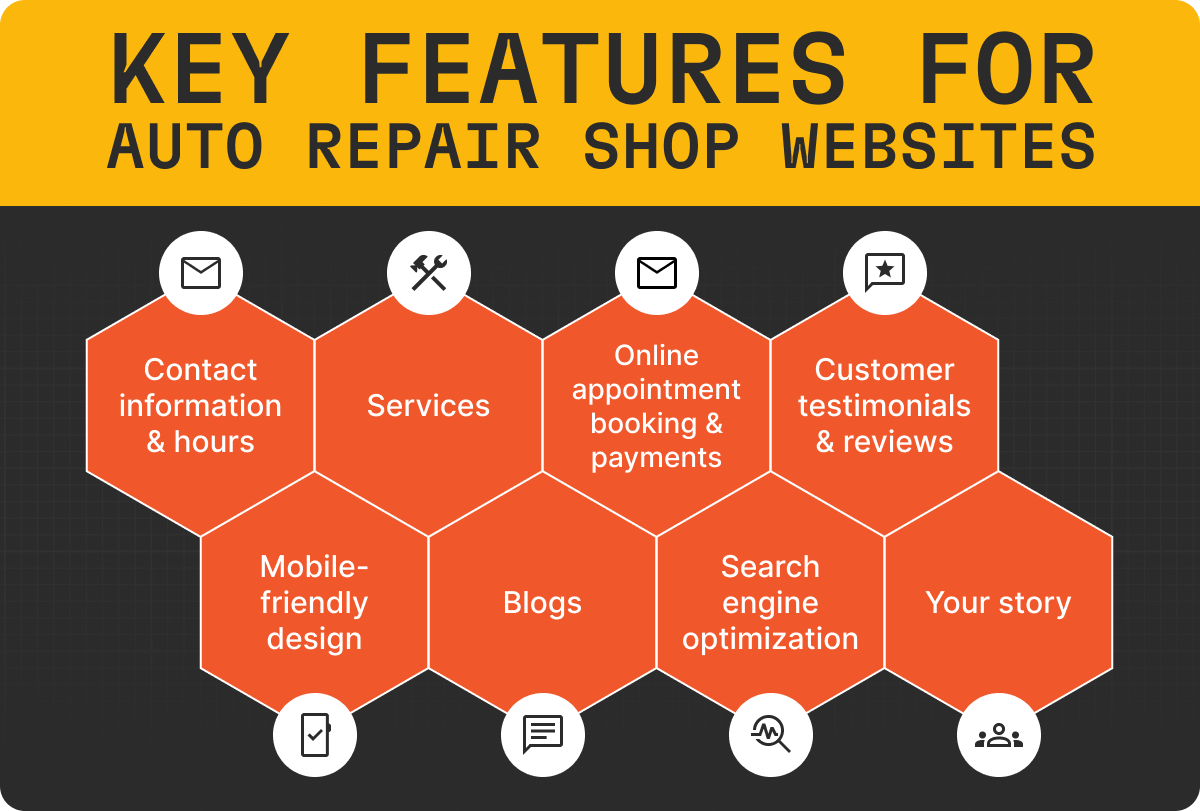
Features to include in an auto repair website.

To be effective, your mechanic website needs more than just a pretty face. It requires specific features and functionality to meet the needs of your customers.

1. Contact information and hours

Your phone number, address (with an embedded, clickable map), and business hours should be prominently visible on your homepage, preferably at the top and bottom of every page. A simple and memorable automotive shop name can also help you be easily remembered when the next check engine light comes on.

2. Add service pages

Don’t just say "we fix cars." Create distinct auto repair service webpages listing all of your car repair services: oil changes, brake repair, engine diagnostics, transmission services, tire rotation, auto care, etc. This not only informs customers but also provides valuable keywords for search engines and helps customers know if you perform the service they need. You can also include your prices if you think it is a selling point.

3. Online appointment scheduling and payments

Convenience is king. An integrated scheduling system that allows customers to select a service and schedule a time slot is a game-changer. It reduces phone tag, streamlines your workflow, and improves the overall customer experience.

Tek-Tip: Overwhelmed? Tired of boring website templates? Let Tekmetric build you a custom website that is tailored to your business. (Must be a Tekmetric customer).

4. Customer testimonials and reviews

Social proof is incredibly persuasive. A dedicated section for reviews from satisfied customers builds trust and validates your quality of work. An easy place to start is by managing and responding to your Google reviews.

5. Mobile-Friendly design

The majority of local searches happen on mobile phones rather than desktops. Your website must be optimized for mobile devices and fully responsive to provide the best user experience.

6. Blogs

Writing blogs about topics your customers care about can be an easy way to drive online engagement and new customers. Make your blogs specific to your geographical area such as “How to fix a flat tire in Houston, Texas” or “What to do when your check engine light comes on in Denver, Colorado”.

7. Search engine optimization

Stop what you are doing and search for your key automotive services in Google. Does your shop show up on the first page of Google? If not, you likely have an opportunity to optimize your SEO strategy and online presence.

8. Clear goals

Your website should make it easy for customers to contact you or to book an appointment. Whether you add a contact form or online booking functionality, make it easy for potential customers to start the process.

9. Your story

Is your shop veteran or family owned and operated? Sharing your story and what makes your shop unique can be a big selling factor for potential customers.

The best website builders for your shop

You don’t need to be a coding expert to build a website. Modern website builder platforms offer intuitive tools that make the process straightforward.

Tekmetric: If you are tired of boring website templates and are already a Tekmetric customer, Tekmetric will build you a custom website design that matches your brand and services. You can even add SEO support and online bookings so you can waste less time on marketing and spend more time with your customers. Best of all, everything syncs with your Tekmetric platform so everything stays in one place.

CAUTION: building your own website can be time consuming, expensive, and lead to poor results. Most website builders do not have automotive industry experience and may not know the best practices. Let Tekmetric build you a custom website that is tailored to your business. (Must be a Tekmetric customer).

Wix: If you want to invest the time and manpower to create your own website, Wix is known for its user-friendly drag-and-drop interface. It offers a wide selection of website templates, including many designed for the automotive industry.

Squarespace: Squarespace is another great option if you want to build your website yourself. Squarespace is known for its clean and modern website design templates.

Best auto repair website templates

Automotive website design templates.

Choosing a website design is about finding an aesthetic that reflects your brand and serves your customers' needs. Look for designs that are clean, professional, and easy to navigate. Here are a few of our favorite automotive websites:

KARR Automotive

The KARR website offers an engaging video on the home page paired with a bright aesthetic. It stands out to prospects with clear call-to-actions, customer testimonials,  services, and contact information.

Anderson Auto Repair

The Anderson website grabs your attention immediately with high-quality shop images with a minimalist aesthetic. We loved the easy to use online booking tool and embedded Google map for easy directions.

Hansen Auto Repair

Hansen Auto Repair has done a great job making their website easy to navigate and incorporating clear call-to-actions. They added specific service level website pages to maximize SEO performance and even added coupons/warranty information. The theme is patriotic while also being professional.

Quality RV Solutions

The last website to make our list was an RV repair shop showcasing that all types of repair shops need a website to drive business. This website also stood out because they added a link to their merchandise store and helpful FAQs.

How to choose the right website design for your shop

With so many options, how do you pick the web design that's right for you?

Define your goals: What is the single most important action you want a visitor to take? Is it to call you? Book online? Visit your shop? Your entire design should guide them toward that goal.

Customer first: Are you serving busy parents who value convenience, or car enthusiasts who appreciate technical detail? Your design, from colors to fonts, should speak their language.

Brand identity: Your website is an extension of your physical car mechanic shop. If your shop is known for being modern and tech-forward, your website should reflect that. If you're a third-generation family business, your site should convey that heritage and trust.

Budget and resources: Consider both the initial cost and the long-term maintenance of the website.

Prioritize functionality: A beautiful website that is slow, confusing, or broken is worse than a simple website that works perfectly. Ensure the website template you choose is fast-loading and provides a seamless user-friendly experience for your visitors.

Final thoughts

Building a modern auto repair website is one of the single best investments you can make in the future of your automotive business. It establishes your credibility and works 24/7 to attract new clients.

How to Build an Auto Repair Website (The Complete Guide)

October 29, 2025

Read time: 3 min

read more

Service advisors serve as the major touchpoint between customers and your shop. While they ultimately need to build repair orders for technicians, they need to get that information from the customer. 

And vice versa, when technicians provide inspection findings, service advisors explain those findings to the customer to figure out the best path forward.

That's why service advisors need to make customer service a focal point of their role, to build that trusting relationship between the customer and your shop.

Because when customers feel like they can trust that your shop is giving them the right recommendations, they'll feel more comfortable approving repair orders for the work their vehicles need to keep running safely and reliably.

The answer to that question depends on a number of factors, and getting the right categorization for each part is crucial for maintaining healthy profit margins while minimizing the risk of rush orders and frustrated customers.

Inventory and Stock Management to Minimize Complexity

When you and your team are replacing parts during repairs, it’s important to consider what parts you have on hand versus what parts you’ll need to order.

If you don’t, you risk overstocking and sinking money into too many units of a particular type of part, or understocking and making a customer wait while you hope that the expedited shipping for a part pulls through.

By having the right inventory and stock management processes in place, you can make it easier for your service advisors and technicians to avoid frustrations.

Here are some best practices for inventory and stock management at your auto repair shop.

Inventory Management Best Practices for Auto Repair Shops

May 22, 2023

Read time: 3 min

read more